
Introduction
In ROS 2, communication between nodes is built around three core mechanisms:
- Topics → continuous data streaming
- Services → synchronous request-response
- Actions → long-running tasks with feedback
Understanding when and how to use each of these is fundamental for building scalable and efficient robotic systems.
Overview Diagram

1. Topics (Publish / Subscribe)
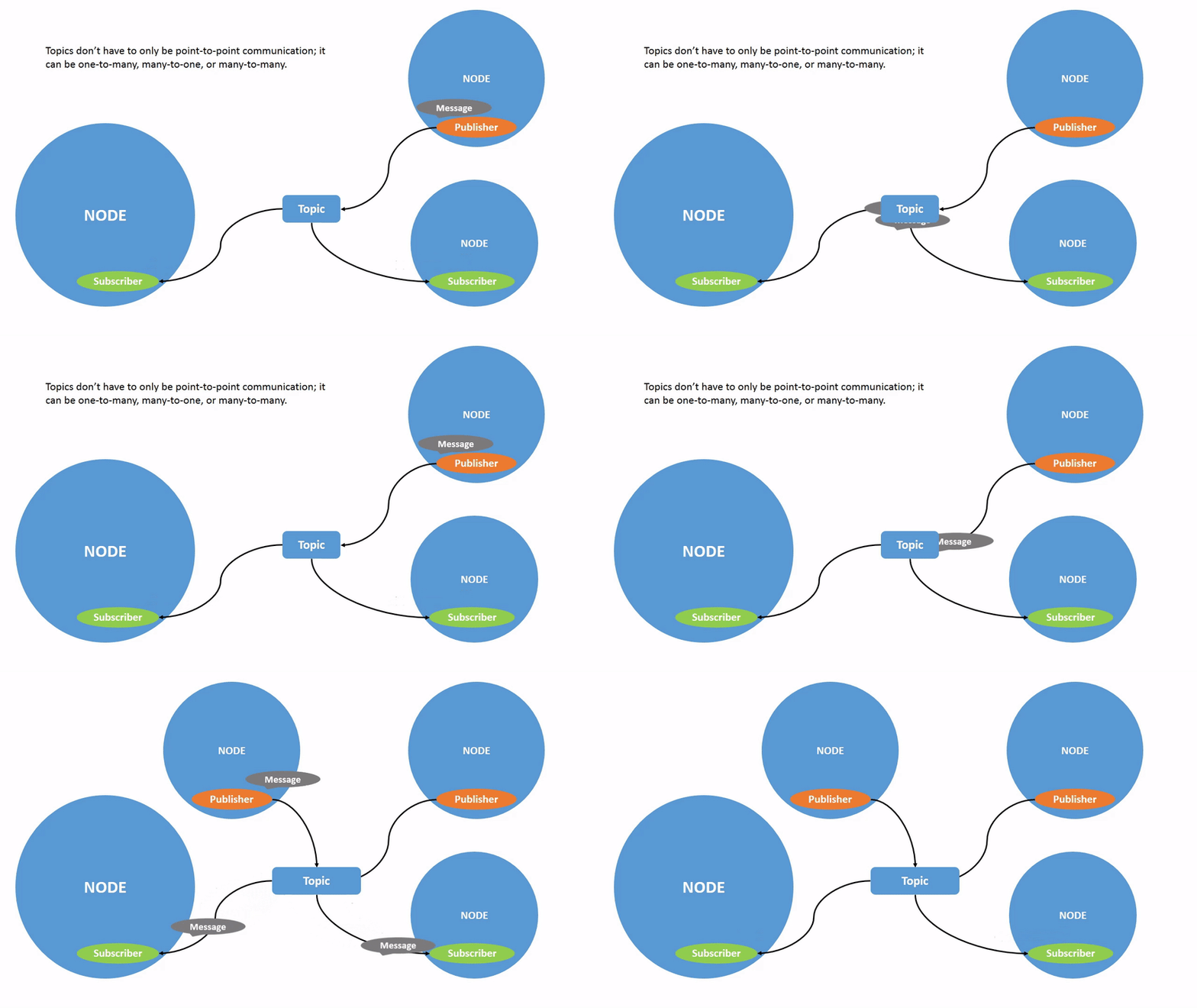
Concept
Topics are the most common communication method in ROS 2. Nodes publish messages to a topic, and other nodes subscribe to receive them.
- Asynchronous communication
- Many publishers and subscribers
- Continuous data flow
When to Use
Use topics when:
- Data is streaming continuously
- Timing is not strictly critical
- Multiple nodes need the same data
Examples
- Camera → publishes images
- LiDAR → publishes scan data
- Robot → publishes odometry
CLI Usage
# List topics
ros2 topic list

# Inspect topic
ros2 topic info /chatter

# Echo messages
ros2 topic echo /chatter

# Publish message
ros2 topic pub /chatter std_msgs/String "data: 'Hello ROS2'"
Python Example
import rclpy
from rclpy.node import Node
from std_msgs.msg import String

class PublisherNode(Node):
    def __init__(self):
        super().__init__('publisher')
        self.pub = self.create_publisher(String, 'chatter', 10)
        self.timer = self.create_timer(1.0, self.publish_msg)

    def publish_msg(self):
        msg = String()
        msg.data = "Hello ROS 2"
        self.pub.publish(msg)

rclpy.init()
node = PublisherNode()
rclpy.spin(node)
2. Services (Request / Response)
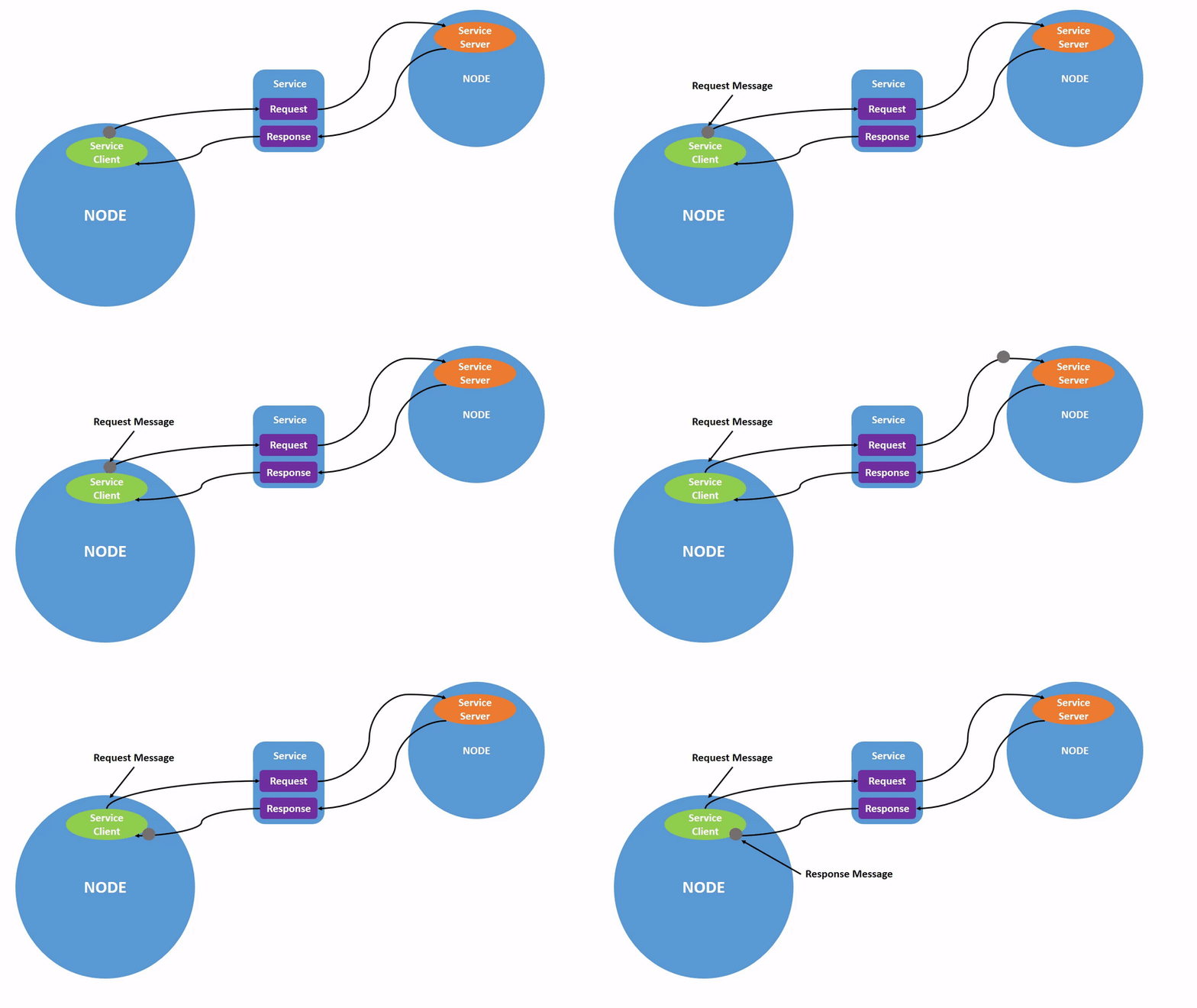
Concept
Services provide synchronous communication between nodes.
- One client sends a request
- One server returns a response
- Blocking call
When to Use
Use services when:
- You need a quick response
- The task is short and deterministic
- You need confirmation
Examples
- Reset simulation
- Turn on/off a robot
- Perform a calculation
CLI Usage
# List services
ros2 service list

# Call a service
ros2 service call /add_two_ints example_interfaces/srv/AddTwoInts "{a: 2, b: 3}"
Python Example
from example_interfaces.srv import AddTwoInts
import rclpy
from rclpy.node import Node

class AddService(Node):
    def __init__(self):
        super().__init__('add_service')
        self.srv = self.create_service(AddTwoInts, 'add_two_ints', self.callback)

    def callback(self, request, response):
        response.sum = request.a + request.b
        return response

rclpy.init()
node = AddService()
rclpy.spin(node)
3. Actions (Goal / Feedback / Result)

Concept
Actions are designed for long-running tasks that need feedback.
- Send a goal
- Receive feedback during execution
- Get final result
- Can cancel
When to Use
Use actions when:
- Tasks take time
- You need progress updates
- You may cancel the task
Examples
- Robot navigation
- Path planning
- Manipulator motion
CLI Usage
# List actions
ros2 action list

# Send goal
ros2 action send_goal /fibonacci example_interfaces/action/Fibonacci "{order: 5}"
Python Example
import rclpy
from rclpy.node import Node
from rclpy.action import ActionServer
from example_interfaces.action import Fibonacci

class FibonacciActionServer(Node):
    def __init__(self):
        super().__init__('fibonacci_server')
        self.server = ActionServer(
            self,
            Fibonacci,
            'fibonacci',
            self.execute_callback
        )

    def execute_callback(self, goal_handle):
        feedback = Fibonacci.Feedback()
        sequence = [0, 1]

        for i in range(2, goal_handle.request.order):
            sequence.append(sequence[i-1] + sequence[i-2])
            feedback.sequence = sequence
            goal_handle.publish_feedback(feedback)

        goal_handle.succeed()
        result = Fibonacci.Result()
        result.sequence = sequence
        return result

rclpy.init()
node = FibonacciActionServer()
rclpy.spin(node)
Comparison Table
| Feature | Topic | Service | Action |
|---|---|---|---|
| Pattern | Publish/Subscribe | Request/Response | Goal/Feedback/Result |
| Blocking | No | Yes | Partially |
| Duration | Continuous | Short | Long-running |
| Feedback | No | No | Yes |
| Cancelable | No | No | Yes |
When to Use What
- Use Topics → streaming sensor data
- Use Services → quick commands
- Use Actions → long tasks with feedback
Conclusion
Topics, Services, and Actions form the backbone of communication in ROS 2. Choosing the correct mechanism is essential for building efficient robotic systems.
A well-designed ROS 2 system typically uses:
- Topics for perception and state
- Services for control commands
- Actions for planning and execution
Understanding these patterns will make your robotic applications more scalable, responsive, and maintainable.