
The Pilz Industrial Motion Planner is a trajectory generator used in robotics applications, specifically with the MoveIt motion planning framework. Here are some key points about the Pilz Industrial Motion Planner:
-
It provides a trajectory generator to plan standard robot motions like PTP (point-to-point), LIN (linear), and CIRC (circular)
-
The planner is a plugin for the MoveIt PlannerManager interface, allowing users to access its trajectory generation functionalities through the MoveGroup user interface
-
The planner generates linear Cartesian trajectories between goal and start poses, using Cartesian limits to generate a trapezoidal velocity profile.
-
It does not consider obstacle avoidance and only tests the trajectory for collision validity after computation.
-
The Pilz Industrial Motion Planner is designed to support solving for circular or linear motions in a rapid and predictable way
It is worth noting that the Pilz Industrial Motion Planner is implemented by Pilz GmbH & Co. KG and is part of the ROSIN FTP (ROS-Industrial Quality-Assured Robot Software Components). It is used in conjunction with the Robot Operating System (ROS), an open-source framework for robotics applications
Advantages of using the Pilz Industrial Motion Planner:
- Rapid and predictable trajectory generation: The Pilz Industrial Motion Planner is designed to support solving for circular or linear motions in a rapid and predictable way. This can be advantageous for applications that require quick and reliable trajectory planning.
- Integration with MoveIt and ROS: The Pilz Industrial Motion Planner is a plugin for the MoveIt PlannerManager interface, allowing users to access its trajectory generation functionalities through the MoveGroup user interface. It is also part of the ROSIN FTP (ROS-Industrial Quality-Assured Robot Software Components) and is used in conjunction with the Robot Operating System (ROS) . This integration can provide users with a powerful and flexible platform for robotics applications.
- Support for linear Cartesian trajectories: The Pilz Industrial Motion Planner generates linear Cartesian trajectories between goal and start poses, using Cartesian limits to generate a trapezoidal velocity profile. This can be useful for applications that require precise and controlled linear motion.
- Python API for intuitive programming: The pilz_robot_programming package provides a Python API for intuitive programming of a MoveIt! enabled robot. This can make it easier for users to program and control their robots using the Pilz Industrial Motion Planner.
- Compatibility with hardware from various
manufacturers: The ROS packages, including the Pilz Industrial Motion
Planner, are compatible with the hardware of various manufacturers. This can provide users with greater flexibility and choice when selecting hardware for their robotics applications.
Architecture of Pilz Industrial Motion Planner pdf
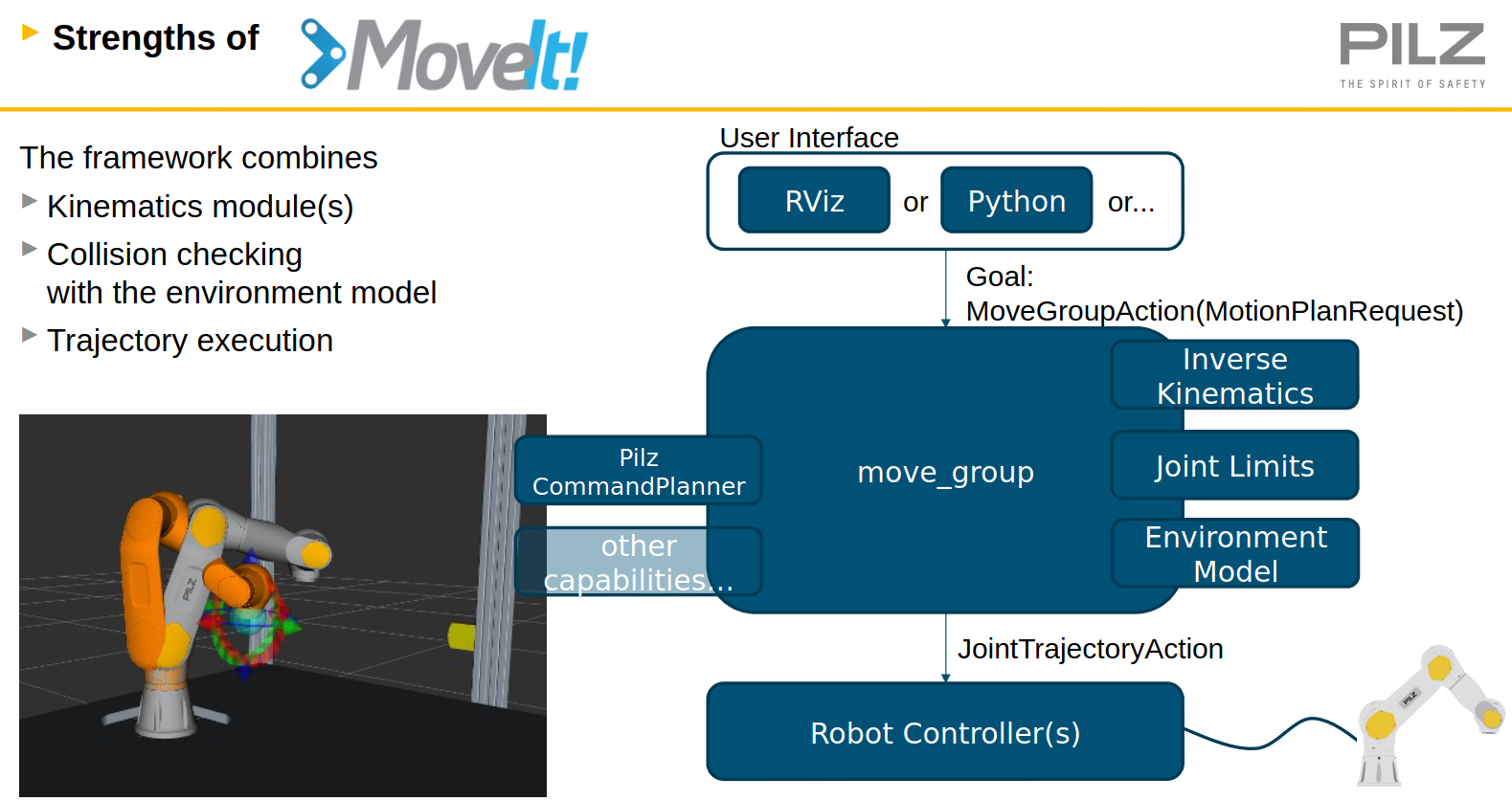
Block digram in ROS code:
Install the Pilz
git clone https://github.com/TriKnight/pilz_industrial_motion/tree/noetic-devel
## Example code Pilz Motion planner with ROS Pilz_demo.py
from geometry_msgs.msg import Point
from pilz_robot_programming import *
import math
import rospy

__REQUIRED_API_VERSION__ = "1"


def start_program():
    print("Executing " + __file__)

    r = Robot(__REQUIRED_API_VERSION__)

    # Simple ptp movement
    r.move(Ptp(goal=[0, 0.5, 0.5, 0, 0, 0], vel_scale=0.4))

    start_joint_values = r.get_current_joint_states()

    # Relative ptp movement
    r.move(Ptp(goal=[0.1, 0, 0, 0, 0, 0], relative=True, vel_scale=0.2))
    r.move(Ptp(goal=Pose(position=Point(0, 0, -0.1)), relative=True))
    r.move(Ptp(goal=[-0.2, 0, 0, 0, 0, 0], relative=True, acc_scale=0.2))

    pose_after_relative = r.get_current_pose()

    # Simple Lin movement
    r.move(Lin(goal=Pose(position=Point(0.2, 0, 0.8)), vel_scale=0.1, acc_scale=0.1))

    # Relative Lin movement
    r.move(Lin(goal=Pose(position=Point(0, -0.2, 0), orientation=from_euler(0, 0, math.radians(15))), relative=True,
           vel_scale=0.1, acc_scale=0.1))
    r.move(Lin(goal=Pose(position=Point(0, 0.2, 0)), relative=True,
           vel_scale=0.1, acc_scale=0.1))

    # Circ movement
    r.move(Circ(goal=Pose(position=Point(0.2, -0.2, 0.8)), center=Point(0.1, -0.1, 0.8), acc_scale=0.1))

    # Move robot with stored pose
    r.move(Ptp(goal=pose_after_relative, vel_scale=0.2))

    # Repeat the previous steps with a sequence command
    sequence = Sequence()
    sequence.append(Lin(goal=Pose(position=Point(0.2, 0, 0.8)), vel_scale=0.1, acc_scale=0.1))
    sequence.append(Circ(goal=Pose(position=Point(0.2, -0.2, 0.8)), center=Point(0.1, -0.1, 0.8), acc_scale=0.1))
    sequence.append(Ptp(goal=pose_after_relative, vel_scale=0.2))

    r.move(sequence)

    # Move to start goal for sequence demonstration
    r.move(Ptp(goal=start_joint_values))

    # Blend sequence
    blend_sequence = Sequence()
    blend_sequence.append(Lin(goal=Pose(position=Point(0.2, 0, 0.7)), acc_scale=0.05), blend_radius=0.01)
    blend_sequence.append(Lin(goal=Pose(position=Point(0.2, 0.1, 0.7)), acc_scale=0.05))

    r.move(blend_sequence)

    # Move with custom reference frame
    r.move(Ptp(goal=PoseStamped(header=Header(frame_id="prbt_tcp"),
                                pose=Pose(position=Point(0, 0, 0.1)))))
    r.move(Ptp(goal=Pose(position=Point(0, -0.1, 0)), reference_frame="prbt_link_3", relative=True))

    # Create and execute an invalid ptp command with out of bound joint values
    try:
        r.move(Ptp(goal=[0, 10.0, 0, 0, 0, 0]))
    except RobotMoveFailed:
        rospy.loginfo("Ptp command did fail as expected.")


if __name__ == "__main__":
    # Init a ros node
    rospy.init_node('robot_program_node')

    start_program()
Troubleshouting
Error 1. ModuleNotFoundError: No module named ‘PyKDL’
- Install PyKDL
sudo apt install python3-pykdl. This installs a library to/usr/lib/python3/dist-packages/PyKDLcpython-38-x86_64-linux-gnu.so - Copy this file to Anaconda environment
cp ./build/devel/lib/python3/dist-packages/PyKDL.so ~/miniconda3/envs/[your_env]/lib/python3.8/lib-dynload - Check PyKDL is available.
python -c "import PyKDL" - Install SIP
sudo apt-get install python-sipReferences
- ROS Planning Pilz Motion planner
- Moveit Pilz Motion Planner.
- Github pilz_industrial_motion
- Pilz Main Page