
Concurrency in C++ refers to the execution of multiple tasks or operations simultaneously, either through multithreading or parallelism. C++11, C++14, and C++17 have introduced various features and libraries to support concurrent programming, making it easier to write efficient and scalable code.
- Multithreading: In multithreading, multiple threads of execution run concurrently within a single program, sharing the same memory space. C++ provides a thread class, mutexes, condition variables, and other synchronization primitives to manage thread interactions and ensure data integrity.
- Parallelism: Parallelism involves dividing a task into smaller subtasks that can be executed simultaneously on multiple processing units, such as CPU cores. C++17 introduced parallel algorithms in the Standard Template Library (STL), allowing most STL-based algorithms to be executed sequentially, in parallel, or vectorized
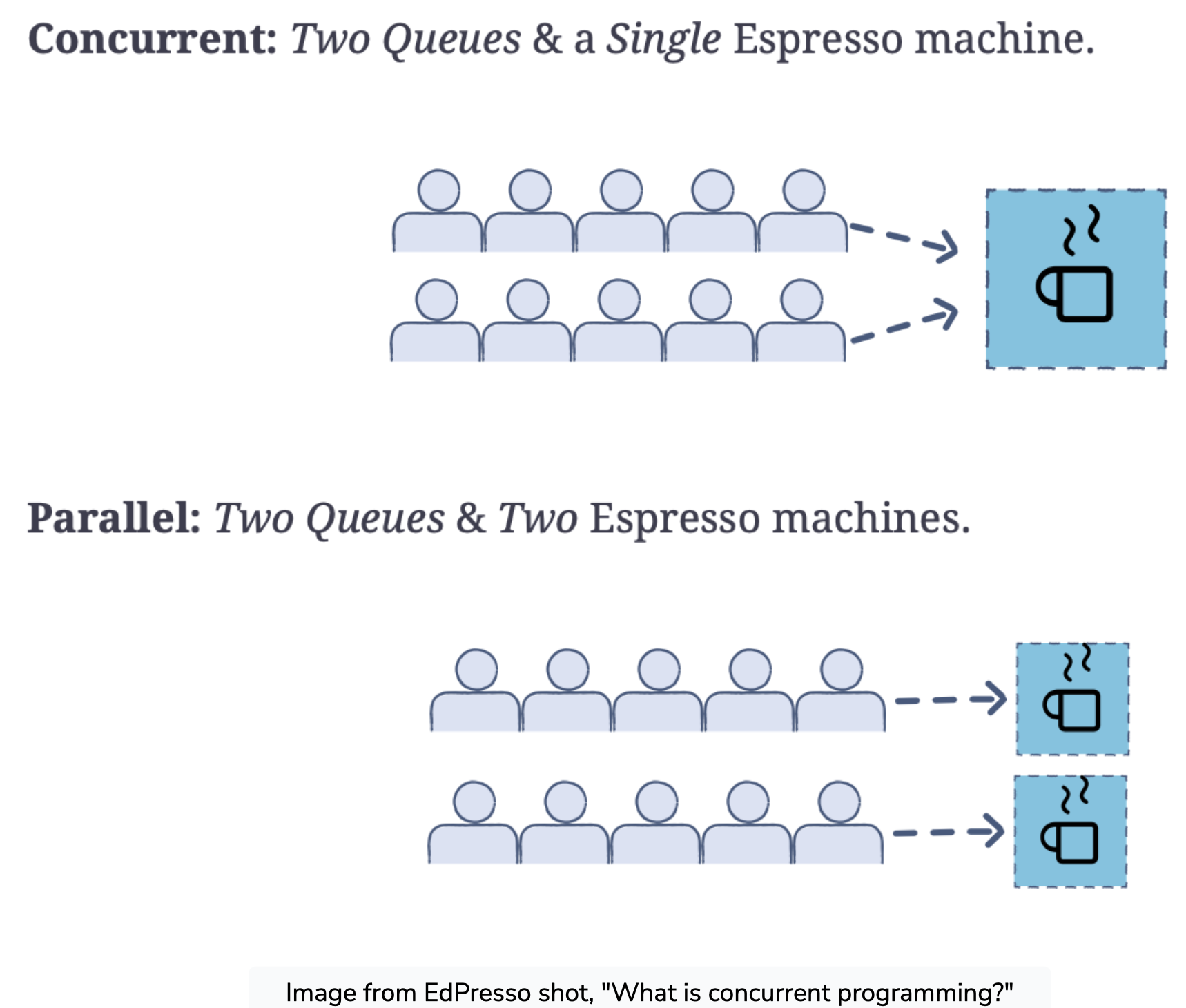
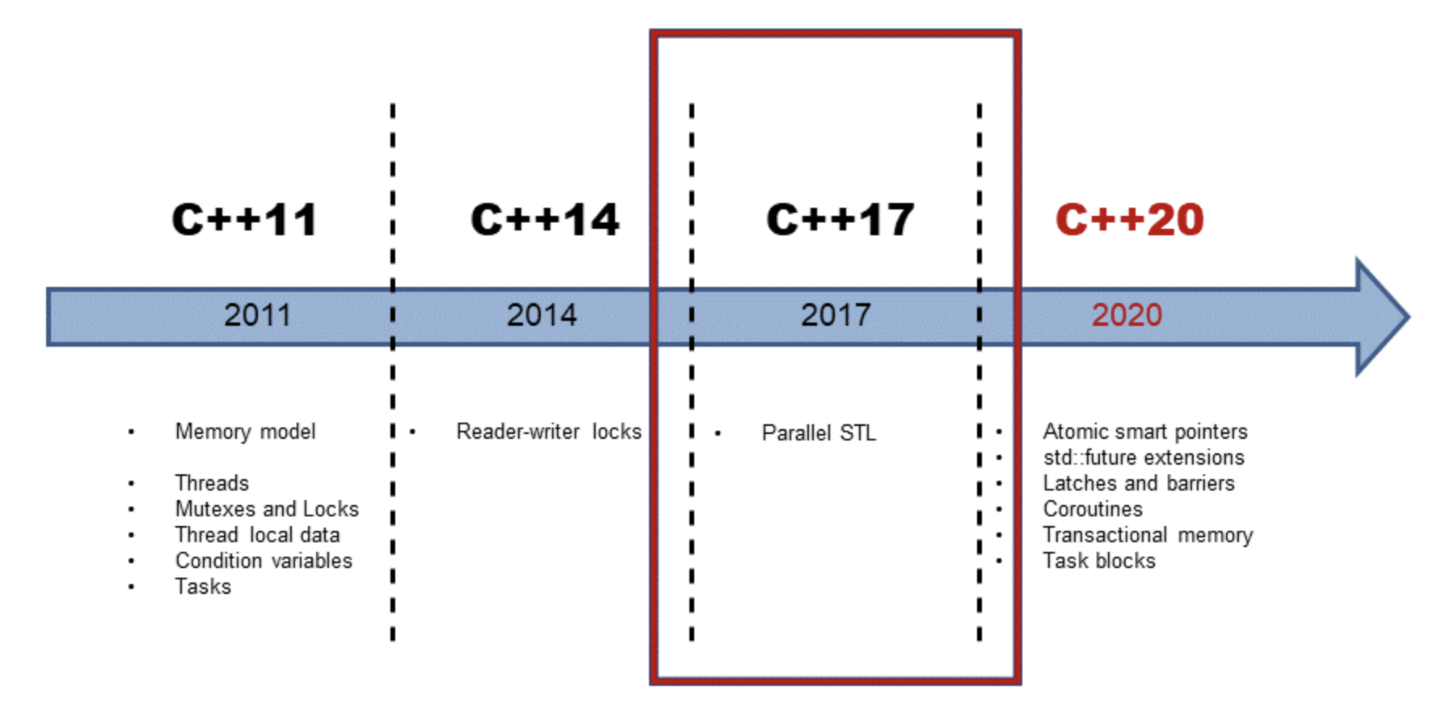
C++ multithreading allows for concurrent execution of two or more parts of a program, maximizing CPU utilization. Each part of a multithreaded program is called a thread, which is a lightweight process within a process. Prior to C++11, developers had to use POSIX threads or the <pthreads> library for multithreading, which caused portability issues. C++11 introduced the std::thread class and related functions in the <thread> header, providing a standard language-provided feature set for multithreading. To create a thread in C++, you can use the std::thread class and pass a callable (an executable code) as an argument to its constructor. Once the std::thread object is created, a new thread is launched, and the code provided by the callable is executed
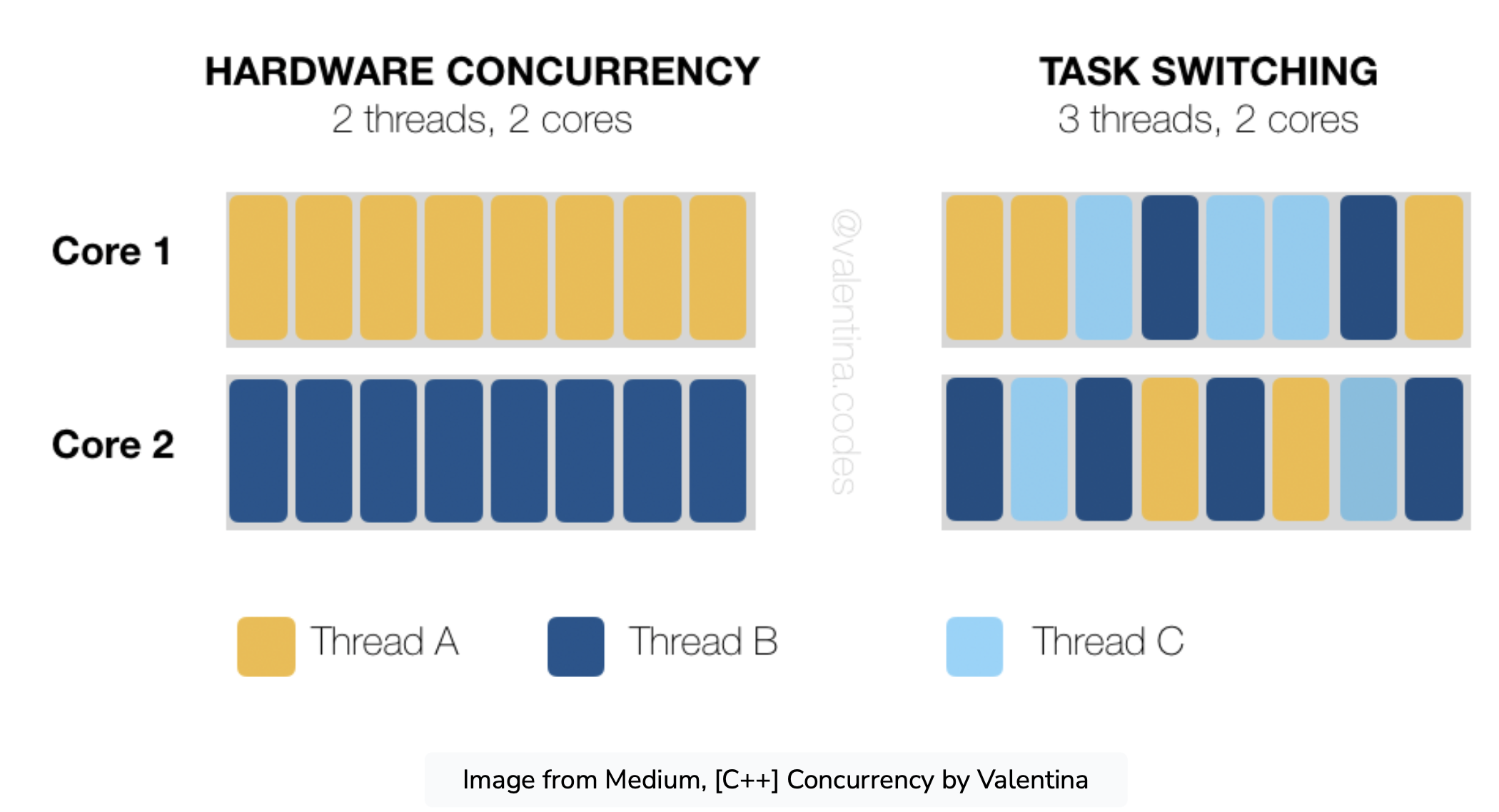
History of C++ Concurrency
C++11 was the first C++ standard to introduce concurrency, including threads, the C++ memory model, conditional variables, and atomic operations. C++11 and C++14 have the basic building blocks for creating concurrent and parallel programs. With C++17, we have the parallel algorithms from the Standard Template Library (STL), which means that most STL-based algorithms can be executed sequentially, parallel, or vectorized
Launching a Thread
Example hello_thread.cpp bellow:
thread_ex.cpp
// First program with std::thread
#include <thread>
#include <iostream>

// Callable object - thread entry point
void hello() {
	std::cout << "Hello, Thread!\n";
}

int main() {
	// Create an std::thread object
	// Pass the entry point function to the constructor
	std::thread thr(hello);

	// Wait for the thread to complete
	thr.join();
}
Example functor_thread.cpp bellow:
functor_thread.cpp
// Example of std::thread with a functor
#include <thread>
#include <iostream>

// Functor class with overloaded () operator
class Hello {
	public:
	void operator()() { std::cout << "Hello, Functor Thread!\n"; }
};

int main() {
	// Create an object of the functor class
	Hello hello;

	// Pass the functor object to std::thread's constructor
	std::thread thr(hello);

	// Wait for the thread to complete
	thr.join();
}
Example lambda_thread.cpp bellow:
lambda_thread.cpp
// Example of using a lambda expression as a thread's entry point
#include <thread>
#include <iostream>

int main() {
	// Use a lambda expression as the thread's entry point
	std::thread thr([]() {
		std::cout << "Hello, Lambda Thread!\n";
	});

	thr.join();
}
When you compile the code, please adding the Threads in CMake
find_package (Threads REQUIRED)

target_link_libraries(helloworld
    ${CMAKE_THREAD_LIBS_INIT}
)
Thread Assignment
A group of children sit in a circle, counting numbers out loud. The first child says “one”, the next child says “two”, the next child says “three”, and so on. However, if the number is divisible by 3, they say “fizz” instead of the number. If the number is divisible by 5, they say “buzz”, and if the number is divisible by 3 and by 5, they say “fizzbuzz”.
Write a function which produces the output from a game of Fizzbuzz:

Abdul says 1

Bart says 2

Claudia says fizz!

Divya says 4

Abdul says buzz!

Bart says fizz!

Claudia says 7

Divya says 8

and so on...
Write a program which calls this function. Check that your program compiles and runs correctly.
Now modify your program so that it plays the game in a separate thread.
Solution without thread
assignment_without_thread.cpp
// Thread assignment

#include <iostream>
#include <thread>

using namespace std;

void dividecheck(int x){
	if (x%3 == 0 && x%5 ==0){
		cout << "fizzbuzz";
	}
	else if(x%3 ==0){
		cout << "fizz";
	}
	else if (x%5 == 0){
		cout << "buzz";
	}

	else{
		cout << x;
	}
}
int main(){
	for (int i = 1; i <= 30; i++){
		cout << "child " << i <<" :" ;
		dividecheck(i);
		cout << endl;
	}
}
Solution with thread
assignment_with_thread.cpp
// Thread assignment

#include <iostream>
#include <thread>

using namespace std;

void dividecheck(){
	for (int x = 1; x <= 30; x++){
		cout << "child " << x <<" :" ;
		if (x%3 == 0 && x%5 ==0){
			cout << "fizzbuzz";
		}
		else if(x%3 ==0){
			cout << "fizz";
		}
		else if (x%5 == 0){
			cout << "buzz";
		}

		else{
			cout << x;
		}
		cout << endl;
	}
}
int main(){
		thread thr1{dividecheck};
		thr1.join();
	}
Ouput
child 1 :1
child 2 :2
child 3 :fizz
child 4 :4
child 5 :buzz
child 6 :fizz
child 7 :7
child 8 :8
child 9 :fizz
child 10 :buzz
child 11 :11
child 12 :fizz
child 13 :13
child 14 :14
child 15 :fizzbuzz
child 16 :16
child 17 :17
child 18 :fizz
child 19 :19
Thread Function with Arguments
To pass arguments to a thread function in C++, there are two main ways: by copy and by reference. The arguments to the thread function are moved or copied by value, so if a reference argument needs to be passed to the thread function, it has to be wrapped in std::ref(). Here are some ways to pass arguments to a thread function in C++:
-
Pass by value: The simplest way to pass arguments to a thread function is to pass them by value. For example, if the thread function takes two integers as arguments, you can create a thread like this:
std::thread t(func, arg1, arg2); -
Pass by reference: To pass arguments by reference, you need to wrap them in
std::ref()to create a reference wrapper. For example, if the thread function takes an integer reference as an argument, you can create a thread like this:std::thread t(func, std::ref(arg)); -
Pass by pointer: You can also pass arguments by pointer, but you need to make sure that the pointer is valid for the lifetime of the thread. For example, if the thread function takes a pointer to an object as an argument, you can create a thread like this:
std::thread t(func, &obj); -
Pass by struct: Another way to pass multiple arguments to a thread function is to wrap them in a struct. For example, if the thread function takes two integers and a string as arguments, you can create a struct to hold them and pass the struct to the thread function:
std::thread t(func, arg_struct);
It’s important to note that passing arguments by reference or pointer can lead to data races and other synchronization issues, so it’s generally safer to pass arguments by value or by struct
An example passing by value std::thread t(func, arg1)
thread_args.cpp
// Example of passing an argument to a thread function
#include <thread>
#include <iostream>

// Callable object - thread entry point
void hello(std::string str) {
    std::cout << str << '\n';
}

int main() {
	// hello() takes a string argument
	std::thread thr(hello, "Hello, Thread!");

	thr.join();
}
// -> Hello, Thread!
An example passing by pointer using a member function as a thread’s entry point std::thread t(func, &obj)
thread_member_function.cpp
// Example of using a member function as a thread's entry point
#include <thread>
#include <iostream>

// Class whose member function
// will be used as the thread's entry point
class greeter {
public:
	void hello() {
		std::cout << "Hello, Member Function Thread!\n";
	}
};

int main() {
	// Create an object of the class
	greeter greet;

	// Create an std::thread object
	// Pass a pointer to the member function
	// and a pointer to the object to call it on
	std::thread thr(&greeter::hello, &greet);

	thr.join();
}
// -> Hello, Member Function Thread!
lvalue and rvalue
In C++, lvalue and rvalue refer to the value categories of expressions. An lvalue is an expression that refers to an object with a persistent identity, such as a variable or a function. An rvalue is an expression that does not have a persistent identity, such as a literal or a temporary object
When passing arguments to a thread function, it’s important to understand the value category of the arguments. If an argument is an lvalue, it can be passed by reference or by pointer. If an argument is an rvalue, it can be passed by value or by reference using std::move() or std::forward()
Example of passing arguments to a thread function by move thread_move.cpp
// Example of passing arguments to a thread function by move
#include <iostream>
#include <thread>
#include <string>

// Thread entry point
// Requires an rvalue argument
void func(std::string&& str) {
	std::cout << "Ownership of \"" << str << "\" transferred to thread" << '\n';
}

int main() {
	std::string str = "moveable";
	std::cout << "Starting thread" << '\n';

	// Wrap str in a call to std::move()
	std::thread thr(func, std::move(str));
	thr.join();

	// Verify that str has been modified
	std::cout << "Do I still have any data?" << ' ';
	std::cout << (str.empty() ? "No" : "Yes") << ".\n";
}
Output
Starting thread
Ownership of "moveable" transferred to thread
Do I still have any data? No.
Passing an lvalue as an rvalue can cause issues when creating a thread, as the arguments are moved or copied by value. If the thread function expects an lvalue reference, it cannot be called with an rvalue reference. In this case, the argument needs to be wrapped in std::ref() to create a reference wrapper.
when passing arguments to a thread function in C++, it’s important to consider the value category of the arguments and use the appropriate method of passing them. If an lvalue needs to be passed as an rvalue, it needs to be wrapped in std::ref() to create a reference wrapper.
Example of passing arguments to a thread function by reference thread_ref.cpp
// Example of passing arguments to a thread function by reference
#include <thread>
#include <iostream>
#include <string>

// Thread entry point
void hello(std::string& s) {
	s = "xyz";
}

int main() {
	std::string str = "abc" ;

	// Wrap argument in a call to std::ref()
	std::thread thr(hello, std::ref(str));
	thr.join();

	// Verify that it has been modified
	std::cout << "str is now " << str << '\n';
}
// -> str is now xyz
Thread and lambda argument
To write a lambda function with arguments in C++, you can pass the lambda function as a callable object to a thread constructor and pass the arguments as additional arguments to the constructor. You can pass arguments by value, by reference, or by pointer, depending on the needs of the lambda function.
Example of using a lambda expression as a thread’s entry point hello_lambda_ref.cpp
// Example of using a lambda expression as a thread's entry point
// The lambda captures a local variable
#include <thread>
#include <iostream>

int main() {
	int i = 3;

	// Use a lambda expression as the thread's entry point
	std::thread thr(
		// The first argument is the lambda expression
		[&i] {
		i *= 2;
	});

	thr.join();

	std::cout << "Value of i is now " << i << '\n';
}
// -> Value of i is now 6
Example of using a lambda expression as a thread’s entry point thread_lambda_arg.cpp
// Example of using a lambda expression as a thread's entry point
// The lambda takes arguments
#include <thread>
#include <iostream>

int main() {
	// Use a lambda expression as the thread's entry point
	std::thread thr(
		// The first argument is the lambda expression
		[] (int i1, int i2) {
			std::cout << "The sum of " << i1 << " and " << i2 << " is "
				<< i1 + i2 << '\n';
		},

		// The remaining arguments are passed to the lambda expression
		2, 3
	);

	thr.join();
}
// The sum if 2 and 3 is 5
Synchronization issues
Synchronization issues can occur when running applications on multiprocessor systems due to assumptions that are valid only on single-processor systems. The following are some common synchronization issues that can occur on multiprocessor systems:
-
Priorities: A program with two threads, one with a higher priority than the other, will not relinquish control to the lower priority thread on a single-processor system because the scheduler gives preference to higher priority threads. On a multiprocessor system, both threads can run simultaneously, each on its processor.
-
Race conditions: Applications should synchronize access to data structures to avoid race conditions. Code that assumes that higher priority threads run without interference from lower priority threads will fail on multiprocessor systems.
-
Cache coherency problems: Multiprocessor systems with CPUs with local caches that are typically connected by bus can have fully separated cache hierarchy, which can lead to cache coherency problems.
Example a scenario where two threads share a variable called “x” and how changes made to the variable by one thread may not be immediately visible to the other thread due to caching and synchronization issues. The following is a summary of the passage:
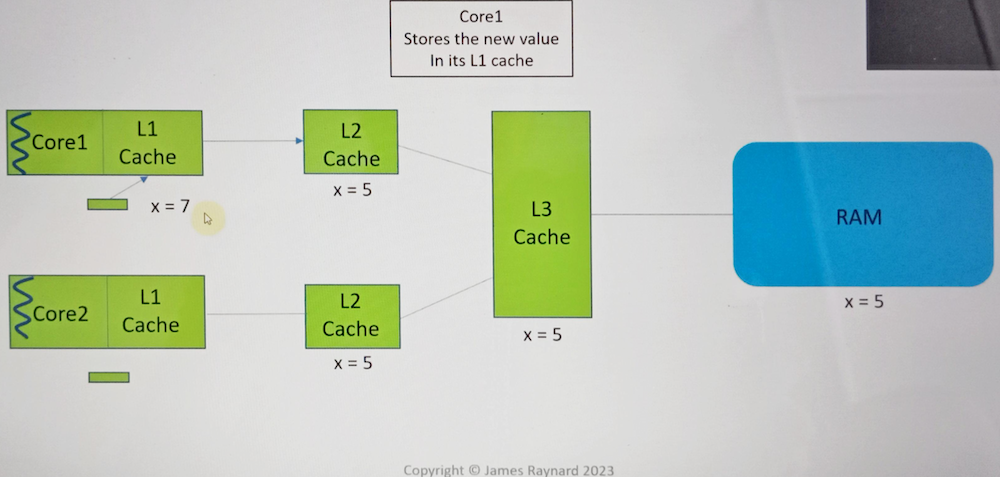
- The system has two cores, each with their Level 1 and Level 2 caches, a shared Level 3 cache, and main memory.
- Two threads share a variable called “x” with an initial value of 5.
- If the thread on core 1 changes the value of x to 7, it writes the value 7 to its store buffer, which is private to core 1.
- The thread on core 2 may get the old value of x (5) from cache and perform some computation using the old value.
- The store buffer on core 1 is eventually flushed, and the new value (7) enters the cache system, which updates all the other caches.
- The new value is published, but it is too late for the thread on core 2, which has already used the old value (5). To avoid synchronization issues, applications should use synchronization mechanisms that rely on hardware-supplied synchronization, such as critical sections, SRW locks, and interlocked functions. But there are things in software you can use to achieve this Mutexes and atomic variables
References
- https://www.educative.io/blog/modern-multithreading-and-concurrency-in-cpp
- https://www.classes.cs.uchicago.edu/archive/2013/spring/12300-1/labs/lab6/
- Ehttps://livebook.manning.com/book/c-plus-plus-concurrency-in-action/chapter-1/
- James Raynard, Learn Multithreading with Modern C++ Udemy.
- http://en.cppreference.com/w/cpp/thread/thread/thread.html
- https://www.codementor.io/@jhadheeraj/thread-how-to-pass-arguments-to-a-thread-14thbsv9pi
- https://www.educative.io/courses/modern-cpp-concurrency-in-practice-get-the-most-out-of-any-machine/passing-arguments-to-threads
- https://www.modernescpp.com/index.php/data-for-threads/